Rectification Dashboard
Where to Find It
- App: KRATOS: Accident Management Portal
- Menu path: Deliveries → Rectification section → Rectification Dashboard
- URL: creatorapp.zoho.com.au/clientportal/test-claims-management-portal/#Page:Rectification_Dashboard
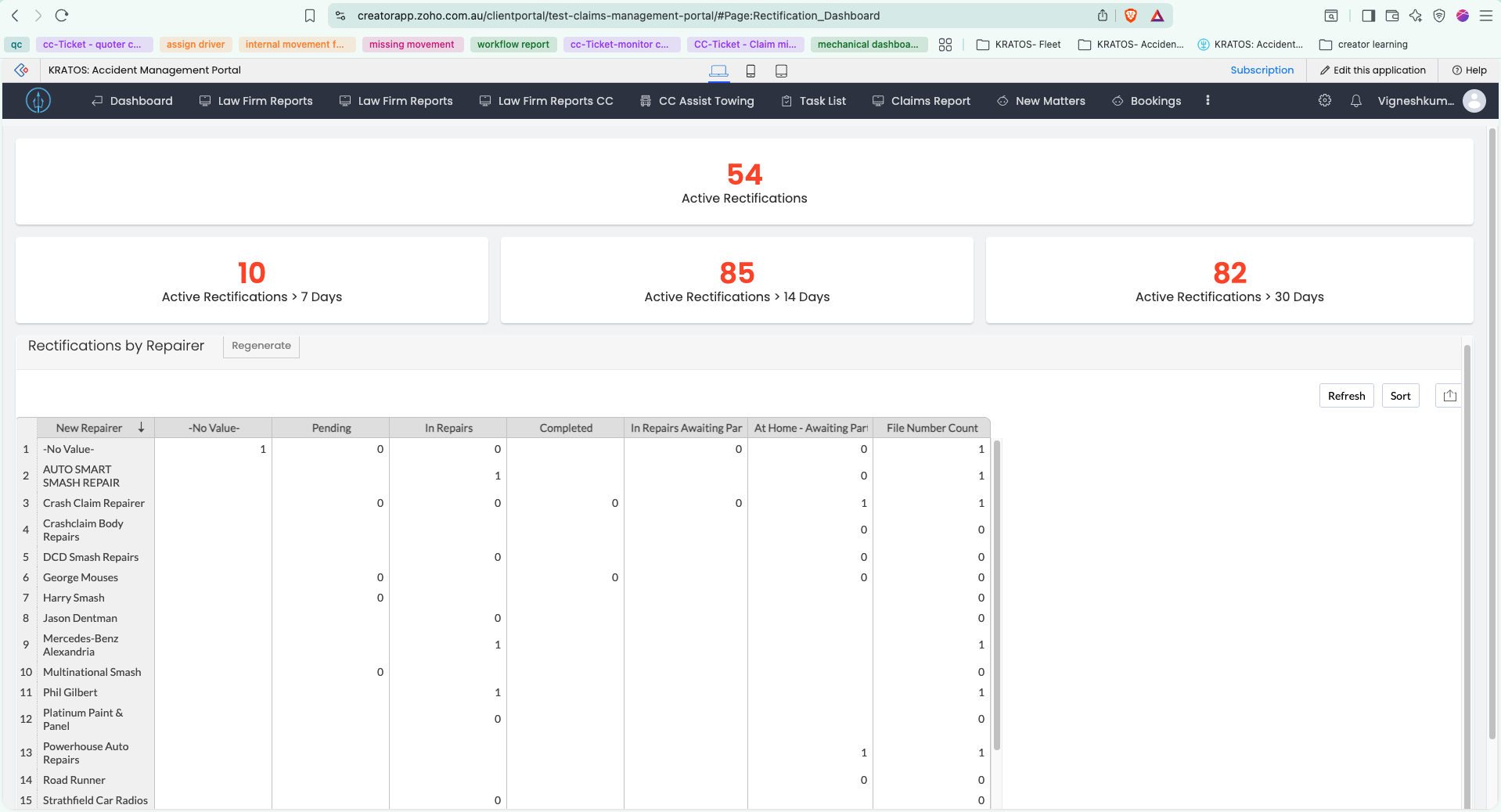
Overview
Stat panels showing the current backlog of Active Rectifications — approved Rectification Requests whose repair hasn't been completed yet — broken down by how long the vehicle has been with the rectification repairer, plus a pivot table breaking that backlog down by repairer. All 4 panels count against the Rectification form; each opens the same Active Rectifications report with a different age-band filter applied. See Rectification Flow for how a record gets here.
Panels
1. Active Rectification
- Form: Rectification
- Display: Count
- Criteria:
Date_Rectification_Repair_Completed is nullIs_Deleted == false
- Report: Active Rectifications
- Report filter:
Date_Rectification_Repair_Completed is null && Is_Deleted == false
2. Active Rectifications > 7 Days
- Form: Rectification
- Display: Count
- Criteria:
Date_Sent_to_Rectification_Repairer < zoho.currentdate.addday(-7)Date_Rectification_Repair_Completed is nullIs_Deleted == false
- Report: Active Rectifications, opened with URL params:
Date_Sent_to_Rectification_Repairer=16-Jul-2026Date_Sent_to_Rectification_Repairer_op=20
3. Active Rectifications > 14 Days
- Form: Rectification
- Display: Count
- Criteria:
Date_Sent_to_Rectification_Repairer < zoho.currentdate.addday(-14)- AND either:
Customer_Vehicle_Status_Rectification == "Pending"Customer_Vehicle_Status_Rectification == "In Repairs"
- Report: Active Rectifications, opened with URL params:
Date_Sent_to_Rectification_Repairer=09-Jul-2026Date_Sent_to_Rectification_Repairer_op=20
4. Active Rectifications > 30 Days
- Form: Rectification
- Display: Count
- Criteria:
Date_Sent_to_Rectification_Repairer < zoho.currentdate.addday(-30)- AND either:
Customer_Vehicle_Status_Rectification == "Pending"Customer_Vehicle_Status_Rectification == "In Repairs"
- Report: Active Rectifications, opened with URL params:
Date_Sent_to_Rectification_Repairer=23-Jun-2026Date_Sent_to_Rectification_Repairer_op=20
Report Deep-Link Parameters
Panels 2–4 don't carry their own saved report — they all open the same Active Rectifications report as Panel 1, but pass the age threshold in as URL query parameters that Zoho Creator applies as an on-open filter:
| Parameter | Meaning |
|---|---|
Date_Sent_to_Rectification_Repairer | The cutoff date to filter against. Computed as zoho.currentdate.addday(-N) when the dashboard renders, then passed as a literal date (e.g. 16-Jul-2026 for the 7-day panel, 09-Jul-2026 for 14-day, 23-Jun-2026 for 30-day) |
Date_Sent_to_Rectification_Repairer_op | The comparison operator Zoho Creator applies to that field. 20 = "less than", matching each panel's Date_Sent_to_Rectification_Repairer < ... criteria |
Because the cutoff date is resolved relative to "today" at render time, the exact date in the link changes daily — the value shown above is only correct for the day the panel was captured.
Pivot Table — Rectifications by Repairer
- Form: Rectification
- Columns:
Customer_Vehicle_Status_Rectification(displayname "Customer Vehicle Status - Rectification") - Rows:
New_Repairer - Data:
File_Number— Count
For every rectification repairer (row), shows how many Rectification records fall into each Customer_Vehicle_Status_Rectification value (column) — the picklist's values are Pending / In Repairs / Completed / In Repairs Awaiting Parts / At Home - Awaiting Parts / CC Site Awaiting Parts, plus -No Value- for records where the field is blank. A File Number Count column gives the row total per repairer, and a Grand Count row gives the column total across all repairers.
Unlike the 4 panels above, the pivot isn't limited to open/active records — it includes every status value, including Completed and Total Loss, so it doubles as a per-repairer volume view, not just a backlog view.