Quoter & Assessor Tracker Dashboard
Source: Quoter_and_Assessor_Tracker_Dashboard.get_details (custom function, called once at page render)
Page URL: https://creatorapp.zoho.com.au/clientportal/test-claims-management-portal/#Page:Quoter_and_Assessor_Tracker_Dashboard
Page input params: month_value, year_value (string) — fed in by the Quoter_and_Assessor_Tracker_Dashboard_Filter form and passed straight into get_details(input.month_value, input.year_value).
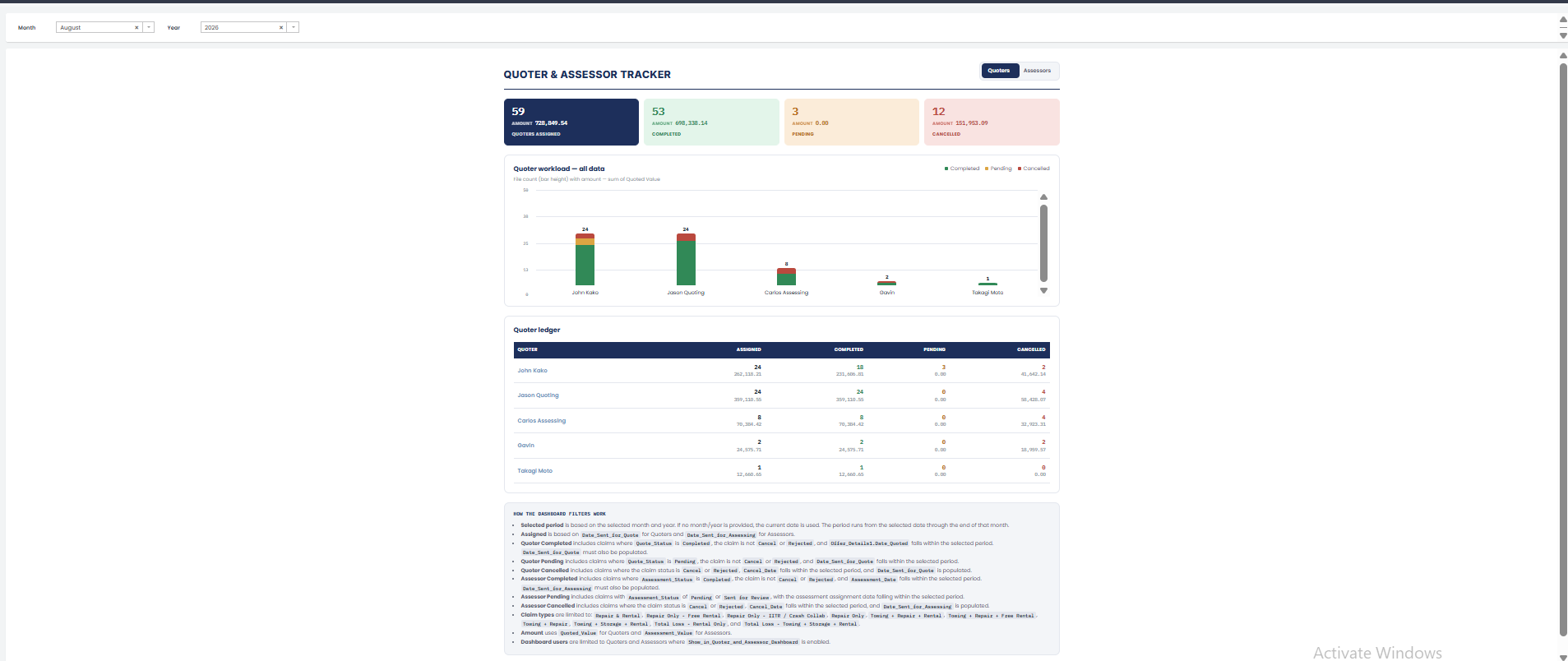
Page Load Logic
- If
month_valueoryear_valueis blank,date_valuedefaults tozoho.currentdate; otherwise it's built from("01-" + month_value + "-" + year_value).toDate(). end_value = date_value.eomonth(0)— every count, sum, and report link on the page is filtered to the[date_value, end_value]month window.- One function call computes two parallel data sets: a Quoters view (grouped by
Quoter1) and an Assessors view (grouped byAssessor). Both share the same claim-type allow-list (below) and the same status logic (below). - Assigned/Completed/Pending/Cancelled are independent cohorts, not a status partition — each is filtered on whichever date field matches that event (see the table in How the Dashboard Filters Work), not all on the same "assigned this month" date. This is a deliberate design choice; see Why the four numbers don't sum for what that means when reading the page.
Month/Year Filter Form
Quoter_and_Assessor_Tracker_Dashboard_Filter — the Month/Year dropdown pair shown at the top of the page (see screenshot above), feeding month_value/year_value into get_details().
Role Toggle (Quoters / Assessors)
A single checkbox (.dt_role-switch-input) styled as a two-pill segmented control ("Quoters" / "Assessors"). Both full views — KPI tiles, chart, and ledger table — are rendered server-side in the same page load; the checkbox only toggles which one is visible, via CSS:
.dt_view-assessors { display: none; }
.dt_shell:has(.dt_role-switch-input:checked) .dt_view-quoters { display: none; }
.dt_shell:has(.dt_role-switch-input:checked) .dt_view-assessors { display: flex; }
No re-fetch happens when switching roles — it's a pure client-side CSS swap.
Claim Type Allow-list
Both views are restricted to Claim_Form.Claim_Type1 being one of:
- Repair & Rental
- Repair Only (Free Rental)
- Repair Only (IITR Crash Collab)
- Repair Only
- Towing + Repair + Rental
- Towing + Repair + Free Rental
- Towing + Repair
- Towing + Storage + Rental
- Total Loss – Rental Only
- Total Loss – Towing/Storage/Rental
This list is serialized once into claim_type_in_link (Claim_Form.Claim_Type1=[...]&Claim_Form.Claim_Type1_op=72, i.e. an "IN" filter) and appended to every report link described below. Rental Only is not in this list — the page's footnote now correctly matches this (it no longer claims Rental Only is included, unlike an earlier revision).
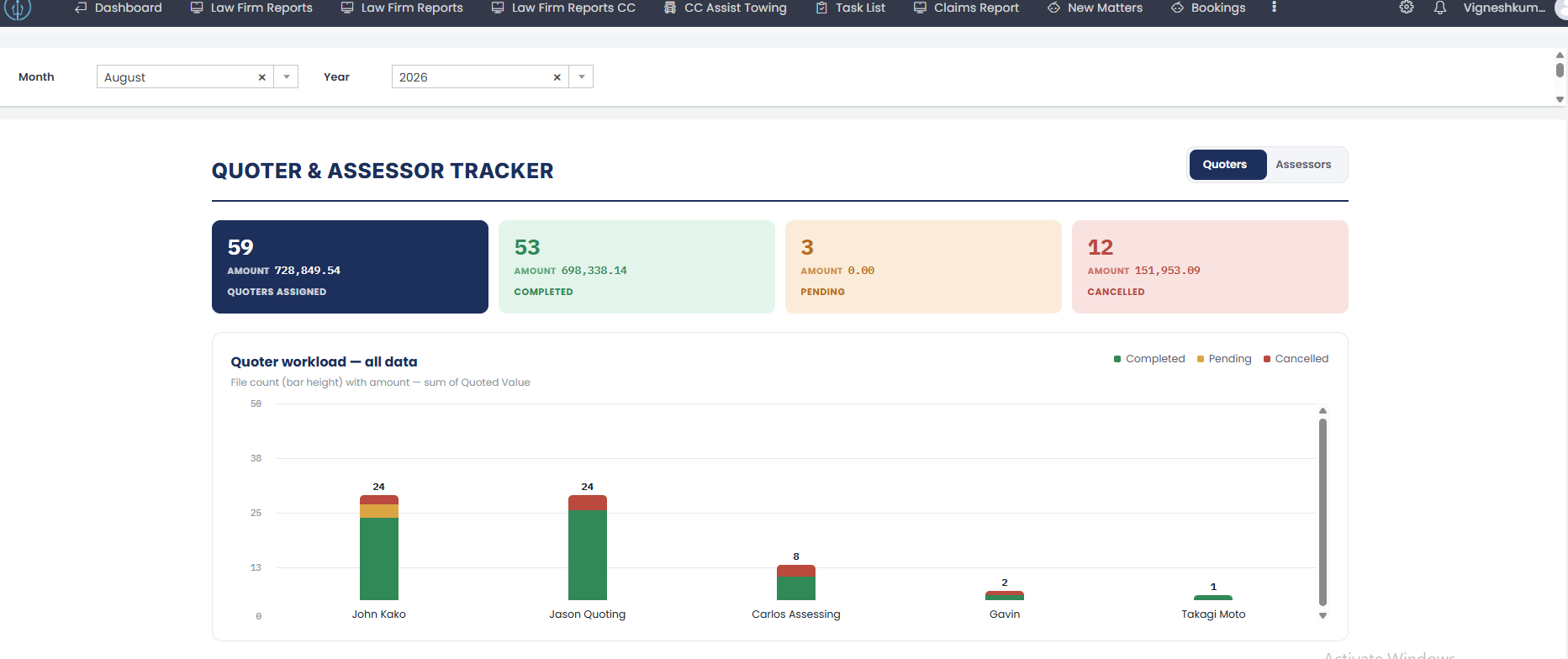
KPI Header Tiles
Four tiles per view, each a clickable card linking out to the Admin_Claims_Management_Report, filtered to that tile's slice of the month window. The workload chart now also prints the total file count above each bar (a .dt_chart-total-count label), in addition to the stacked segments.
| Tile | Count field | Amount field | Report link field |
|---|---|---|---|
| Assigned (total) | count | amount | report_link |
| Completed | completed_count | completed_amount | completed_report_link |
| Pending | pending_count | pending_amount | pending_report_link |
| Cancelled | cancelled_count | cancelled_amount | cancelled_report_link |
Amount sums Quoted_Value for the Quoters view and Assessment_Value for the Assessors view.
Panel Criteria (detail)
Quoters view
1. Quoters Assigned
- Form:
Claims_Management_Form - Display: Count —
quoter_all.count(); Amount —quoter_all.sum(Quoted_Value) - Criteria:
Claim_Form != null && Claim_Form.Claim_Type1 in claim_typeQuoter1 != null && Quoter1.Show_in_Quoter_and_Assessor_Dashboard == trueDate_Sent_for_Quote >= date_value && Date_Sent_for_Quote <= end_valueQuote_Status != null && Status != null— excludes claims that don't yet have a determinate quote/claim status
- Report:
Admin_Claims_Management_Report - Report filter:
Claim_Form_op=30+ claim-type allow-list +Quoter1_op=30&Quoter1.Show_in_Quoter_and_Assessor_Dashboard=true+Date_Sent_for_Quote=<date_value>;<end_value>&Date_Sent_for_Quote_op=58
2. Quoters Completed
- Form:
Claims_Management_Form - Display: Count —
completed_quoter_all.count(); Amount —completed_quoter_all.sum(Quoted_Value) - Criteria:
Claim_Form != null && Claim_Form.Claim_Type1 in claim_type && Quoter1 != nullStatus not in [Cancel, Rejected]Quote_Status == "Completed"Offer_Details1.Date_Quoted >= date_value && Offer_Details1.Date_Quoted <= end_value— note: a different date field than Assigned (#1)Date_Sent_for_Quote != null
- Report:
Admin_Claims_Management_Report - Report filter: same base params as #1, plus
Status=[Cancel,Rejected]&Status_op=19(not-in) +Quote_Status=Completed+Offer_Details1.Date_Quoted=<date_value>;<end_value>&Offer_Details1.Date_Quoted_op=58+Date_Sent_for_Quote_op=30(not empty)
3. Quoters Pending
- Form:
Claims_Management_Form - Display: Count —
pending_quoter_all.count(); Amount —pending_quoter_all.sum(Quoted_Value) - Criteria:
Claim_Form != null && Claim_Form.Claim_Type1 in claim_type && Quoter1 != nullStatus not in [Cancel, Rejected]Quote_Status == "Pending"Date_Sent_for_Quote >= date_value && Date_Sent_for_Quote <= end_value— same date field as Assigned (#1)
- Report:
Admin_Claims_Management_Report - Report filter: same base params as #1, plus
Status=[Cancel,Rejected]&Status_op=19(not-in) +Quote_Status=Pending
4. Quoters Cancelled
- Form:
Claims_Management_Form - Display: Count —
cancelled_quoter_all.count(); Amount —cancelled_quoter_all.sum(Quoted_Value) - Criteria:
Claim_Form != null && Claim_Form.Claim_Type1 in claim_type && Quoter1 != nullStatus in [Cancel, Rejected]Cancel_Date >= date_value && Cancel_Date <= end_value— note: a different date field than Assigned (#1)Date_Sent_for_Quote != null
- Report:
Admin_Claims_Management_Report - Report filter: same base params as #1, plus
Status=[Cancel,Rejected]&Status_op=18(in) +Cancel_Date=<date_value>;<end_value>&Cancel_Date_op=58+Date_Sent_for_Quote_op=30(not empty)
Assessors view
Same shape as the Quoters view, substituting Assessor for Quoter1, Assessment_Status for Quote_Status, and Assessment_Value for Quoted_Value. Differences from the Quoters view: Pending groups two statuses together, Assigned has no Assessment_Status != null && Status != null guard (unlike Quoters Assigned), and Pending has a real logic bug — see Mockup Notes.
5. Assessors Assigned
- Form:
Claims_Management_Form - Display: Count —
assessor_all.count(); Amount —assessor_all.sum(Assessment_Value) - Criteria:
Claim_Form != null && Claim_Form.Claim_Type1 in claim_typeAssessor != null && Assessor.Show_in_Quoter_and_Assessor_Dashboard == trueDate_Sent_for_Assessing >= date_value && Date_Sent_for_Assessing <= end_value
- Report:
Admin_Claims_Management_Report - Report filter:
Claim_Form_op=30+ claim-type allow-list +Assessor_op=30&Assessor.Show_in_Quoter_and_Assessor_Dashboard=true+Date_Sent_for_Assessing=<date_value>;<end_value>&Date_Sent_for_Assessing_op=58
6. Assessors Completed
- Form:
Claims_Management_Form - Display: Count —
completed_assessor_all.count(); Amount —completed_assessor_all.sum(Assessment_Value) - Criteria:
Claim_Form != null && Claim_Form.Claim_Type1 in claim_type && Assessor != nullStatus not in [Cancel, Rejected]Assessment_Status == "Completed"Assessment_Date >= date_value && Assessment_Date <= end_value— note: a different date field than Assigned (#5)Date_Sent_for_Assessing != null
- Report:
Admin_Claims_Management_Report - Report filter: same base params as #5, plus
Status=[Cancel,Rejected]&Status_op=19(not-in) +Assessment_Status=Completed+Assessment_Date=<date_value>;<end_value>&Assessment_Date_op=58+Date_Sent_for_Assessing_op=30(not empty)
7. Assessors Pending
- Form:
Claims_Management_Form - Display: Count —
pending_assessor_all.count(); Amount —pending_assessor_all.sum(Assessment_Value) - Criteria (as written):
Status not in [Cancel, Rejected] && Assessment_Status == "Pending" || Assessment_Status == "Sent for Review" && Date_Sent_for_Assessing >= date_value && Date_Sent_for_Assessing <= end_value
- This has an operator-precedence bug — see Mockup Notes for what it actually evaluates to.
- Report:
Admin_Claims_Management_Report - Report filter: same base params as #5, plus
Status=[Cancel,Rejected]&Status_op=19(not-in) +Assessment_Status=[Pending,Sent for Review]+Date_Sent_for_Assessing=<date_value>;<end_value>&Date_Sent_for_Assessing_op=58
8. Assessors Cancelled
- Form:
Claims_Management_Form - Display: Count —
cancelled_assessor_all.count(); Amount —cancelled_assessor_all.sum(Assessment_Value) - Criteria:
Claim_Form != null && Claim_Form.Claim_Type1 in claim_type && Assessor != nullStatus in [Cancel, Rejected]Cancel_Date >= date_value && Cancel_Date <= end_value— note: a different date field than Assigned (#5)Date_Sent_for_Assessing != null
- Report:
Admin_Claims_Management_Report - Report filter: same base params as #5, plus
Status=[Cancel,Rejected]&Status_op=18(in) +Cancel_Date=<date_value>;<end_value>&Cancel_Date_op=58+Date_Sent_for_Assessing_op=30(not empty)
Workload Chart
A stacked column chart, one column per quoter/assessor, built from quoter_table/assessor_table:
- Iterates
Add_Quoter/Add_Assessorrecords whereShow_in_Quoter_and_Assessor_Dashboard == true; a person with zero claims in the month window is skipped entirely (not shown as an empty column). - For each remaining person, computes the same four figures as the header tiles (
total,completed,pending,cancelled, each with its amount), scoped to that one person viaQuoter1 == row_quoter.ID/Assessor == row_assessor.ID. - Sort order: descending by
totalfile count. Implemented by building a sort key(total + 100000000).toString() + "::" + name, sorting the key list descending, then remapping back to rows — a workaround for the platform's list-sort not supporting a numeric comparator directly. - Bar height:
bar_height = (row_total * 260px) / scale_max, clamped to a 3px minimum so non-zero bars stay visible.scale_maxis picked from a fixed step table (10, 20, 50, 100, 200, 500, 1000, 2000, 5000, 10000, 20000, 50000, 100000, 200000, 500000, 1000000, 2000000) — the smallest step that's still ≥max_total * 1.05across all people in that view, so the tallest bar never quite touches the top gridline. - Total count label: the
totalfile count is printed above each bar (.dt_chart-total-count), independent of the stacked segments below it. - Segments: each bar is a flex row of up to three stacked
<a>segments (completed / pending / cancelled), each sized byflex-grow:<count>— i.e. segment height is proportional to that status's share of the person's total, not an absolute pixel value. Each segment now has a correctly-formed tooltip (title="Completed: <n>"etc.) — see Mockup Notes for the earlier broken version. - Y-axis gridlines/ticks are drawn at 0%, 25%, 50%, 75%, 100% of
scale_max.
Ledger Table
One row per quoter/assessor (same quoter_table/assessor_table list backing the chart, same sort order), with five stat cells: Assigned, Completed, Pending, Cancelled (count + amount each), all deep-linking to Admin_Claims_Management_Report scoped to that one person (Quoter1.ID=<id> / Assessor.ID=<id>) plus the matching status filter from the panel list above.
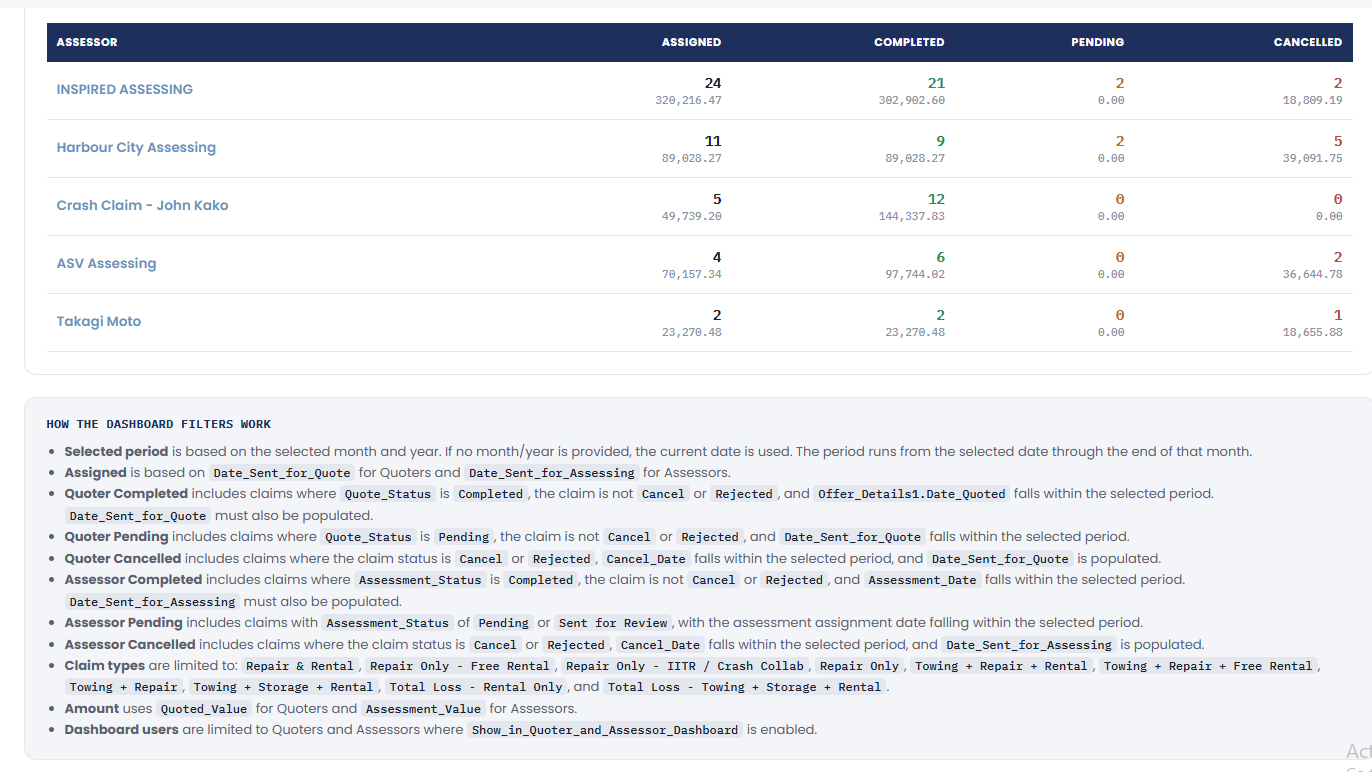
How the Dashboard Filters Work
The page's own footnote (rendered from a static <ul> in html_code.txt, titled "How the dashboard filters work") restates the logic above for end users:
- Selected period is based on the selected month/year (current date if blank), running from the selected date through the end of that month.
- Assigned is based on
Date_Sent_for_Quote(Quoters) /Date_Sent_for_Assessing(Assessors). - Quoter Completed —
Quote_StatusisCompleted, notCancel/Rejected, andOffer_Details1.Date_Quotedfalls in the selected period;Date_Sent_for_Quotemust also be populated. - Quoter Pending —
Quote_StatusisPending, notCancel/Rejected, andDate_Sent_for_Quotefalls in the selected period. - Quoter Cancelled — status is
Cancel/Rejected,Cancel_Datefalls in the selected period, andDate_Sent_for_Quoteis populated. - Assessor Completed —
Assessment_StatusisCompleted, notCancel/Rejected, andAssessment_Datefalls in the selected period;Date_Sent_for_Assessingmust also be populated. - Assessor Pending —
Assessment_StatusisPendingorSent for Review, with the assessment assignment date falling in the selected period. - Assessor Cancelled — status is
Cancel/Rejected,Cancel_Datefalls in the selected period, andDate_Sent_for_Assessingis populated. - Claim types are limited to the allow-list above (spelled out in full in the footnote itself).
- Amount uses
Quoted_Value(Quoters) /Assessment_Value(Assessors). - Dashboard users are limited to Quoters/Assessors with
Show_in_Quoter_and_Assessor_Dashboardenabled.
Why the Four Numbers Don't Sum to Assigned
Assigned, Completed, Pending, and Cancelled are each filtered on a different date field representing when that specific event happened — not a status breakdown of one fixed "assigned this month" population:
| Bucket | Date field |
|---|---|
| Assigned | Date_Sent_for_Quote / Date_Sent_for_Assessing |
| Completed | Offer_Details1.Date_Quoted (quoters) / Assessment_Date (assessors) |
| Pending | Date_Sent_for_Quote / Date_Sent_for_Assessing (same as Assigned) |
| Cancelled | Cancel_Date |
Only Pending shares its date field with Assigned. So a claim sent for quote/assessing in a previous month but completed or cancelled this month shows up in this month's Completed/Cancelled count without ever being counted in this month's Assigned total — and the reverse can happen too (assigned this month, resolved later). This is expected: read Assigned as "new quotes/assessments requested this month," and Completed/Pending/Cancelled as "quotes/assessments that reached that status this month," not as a partition that must sum to Assigned.
(An intermediate revision of this function briefly filtered Completed/Cancelled on the same date field as Assigned specifically to make these reconcile — that approach was not kept; the current version is back to the cohort model above.)