Management Dashboard V1
Where to Find It
- App: KRATOS: Accident Management Portal
- Menu path: Dashboard → Management Dashboard V1
- URL: creatorapp.zoho.com.au/clientportal/test-claims-management-portal/#Page:Management_Dashboard_V1
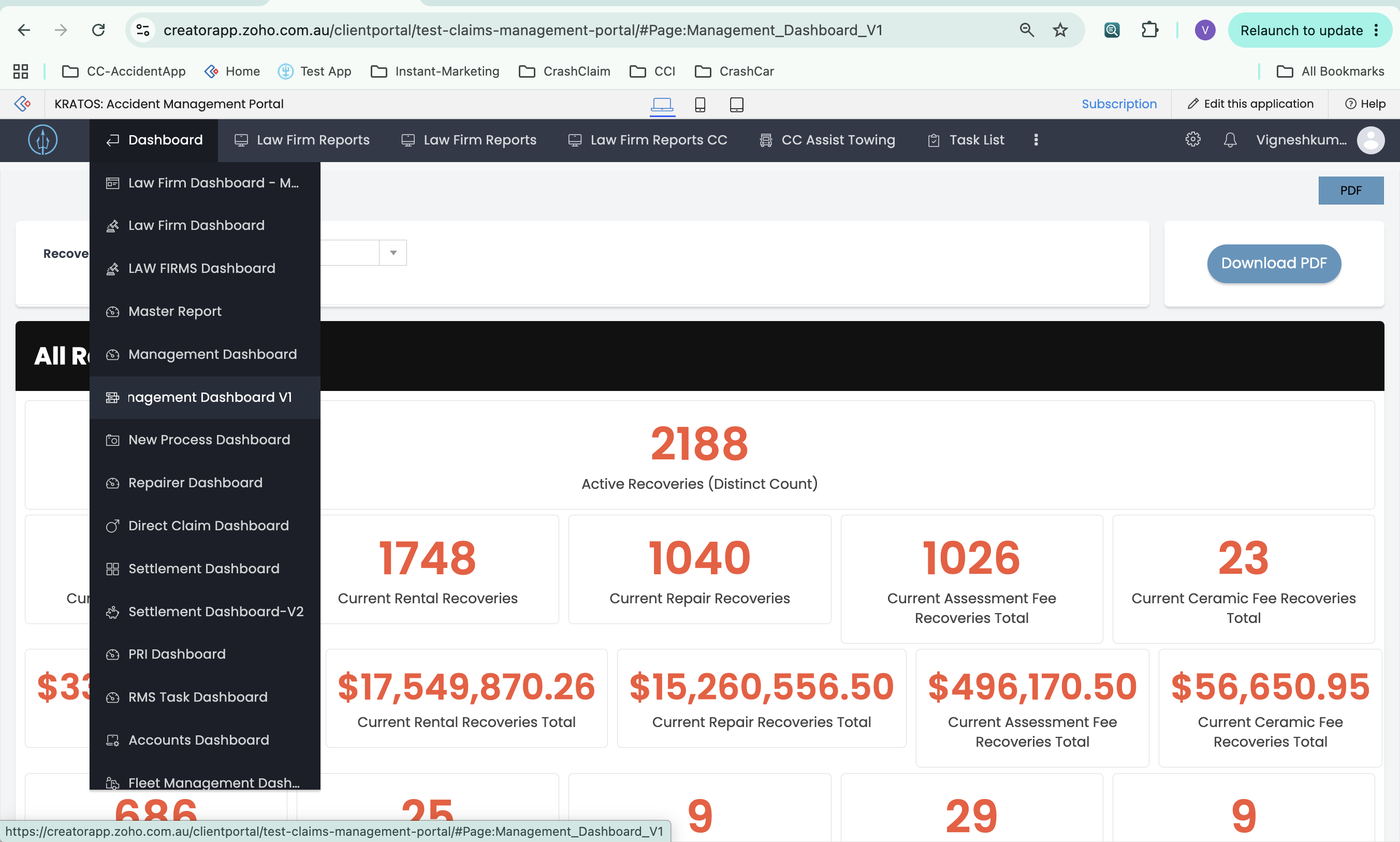
Overview
The dashboard is powered by the get_panel_details function. If a recovery firm is selected, all panels are scoped to that firm. If none is selected, all panels show data across all recovery firms (any matter with a recovery firm assigned).
Base Active Recovery Criteria
The following conditions are applied to most active recovery panels:
- State is Enable
- Recovery Firm is the selected firm (or is not empty, for the All Firms view)
- Status is not Cancel
- Status1 is not Settled, Excess Waived, Closed, Cancel, or Remitted
- Date Settled is empty
- File Number is not empty
Panels
1. Active Recoveries (Distinct Count)
- Display: Count
- Criteria: Base active recovery criteria, counted as unique File Numbers
- Note: Counts unique matters (files), not demand line items
2. Current Active Recoveries
- Display: Count
- Criteria: Base active recovery criteria
- On Click: Opens the report
Active_Recoveries_CC
3. Current Recoveries
- Display: Currency
- Value: Sum of Demand Value on the base active recovery set
4. Current Rental Recoveries
- Display: Count
- Criteria: Base criteria, Demand Type is Rental
- On Click: Opens the report
Active_Recoveries_CC
5. Current Rental Recoveries Total
- Display: Currency
- Value: Sum of Demand Value where Demand Type is Rental
6. Current Repair Recoveries
- Display: Count
- Criteria: Base criteria, Demand Type is Repair
- On Click: Opens the report
Active_Recoveries_CC
7. Current Repair Recoveries Total
- Display: Currency
- Value: Sum of Demand Value where Demand Type is Repair
8. Current Assessment Fee Recoveries Total (Count)
- Display: Count
- Criteria: Base criteria, Demand Type is Repair, Assessment Fee is greater than 0
- On Click: Opens the report
Active_Recoveries_CC
9. Current Assessment Fee Recoveries Total (Sum)
- Display: Currency
- Value: Sum of the Assessment Fee field where Demand Type is Repair and Assessment Fee is greater than 0
10. Current Ceramic Fee Recoveries Total (Count)
- Display: Count
- Criteria: Base criteria, Demand Type is Repair, Ceramic is greater than 0
- On Click: Opens the report
Active_Recoveries_CC
11. Current Ceramic Fee Recoveries Total (Sum)
- Display: Currency
- Value: Sum of the Ceramic field where Demand Type is Repair and Ceramic is greater than 0
12. Current Towing/Storage Recoveries
- Display: Count
- Criteria: Base criteria, Demand Type is Towing/Storage
13. Current Towing/Storage Total
- Display: Currency
- Value: Sum of Demand Value where Demand Type is Towing/Storage
14. Current Fleet Damage Recoveries
- Display: Count
- Criteria: Base criteria, Lead Source contains "Loan Car Accident"
15. Current Fleet Damage Total
- Display: Currency
- Value: Sum of Demand Value where Lead Source contains "Loan Car Accident"
16. Current Supplementary Repairs Recoveries
- Display: Count
- Criteria: Base criteria, Demand Type is Supplementary Repair
17. Current Supplementary Repairs Total
- Display: Currency
- Value: Sum of Demand Value where Demand Type is Supplementary Repair
18. Current Insurance Excess Recoveries
- Display: Count
- Criteria: Base criteria, Demand Type is Insurance Excess
19. Current Insurance Excess Total
- Display: Currency
- Value: Sum of Demand Value where Demand Type is Insurance Excess
20. Current Shortfall Recoveries
- Display: Count
- Criteria:
- State is Enable
- Status1 is not Cancel or Closed
- Date Settled is not empty
- Date Remitted is empty
- Demand Type is Shortfall
21. Current Shortfall Total
- Display: Currency
- Value: Sum of Demand Value on the shortfall criteria above
22. Current Baby Seat Fee Recoveries Total
- Display: Currency
- Criteria: Rental demands (base criteria, Demand Type is Rental)
- Value: Sum of Baby Seat Rental Installation, New Baby Seat Installation, Rental Baby Seat, and Cost of Damaged Baby Seat, added together
23. Current Active Recoveries Over $30,000
- Display: Count
- Criteria: Base active recovery criteria, Demand Value is greater than $30,000
24. If CC Purchased Vehicle, Recovery Outstanding
- Display: Count
- Criteria: Base criteria, "Has the Vehicle Been Purchased from a Client" is Yes
Settlement Panels
25. Awaiting Payment Total
- Display: Currency
- Value: Sum of Settlement Amount
- Criteria:
- State is Enable
- Status1 is not Cancel
- Status1 is Settled
- Date Remitted is empty
- Date Settled is not empty
26. Outstanding Payments 28 Days from Date Settled
- Display: Currency
- Value: Sum of Demand Value
- Criteria:
- State is Enable
- Status1 is not Cancel
- Date Remitted is empty
- Date Settled is in the last 28 days
27. Total Settlements For The Current Month
- Display: Currency
- Value: Sum of Settlement Amount
- Criteria:
- State is Enable
- Status1 is not Cancel
- Date Remitted is empty
- Date Settled is in the current month
28. Total Settlements For The Previous Month
- Display: Currency
- Value: Sum of Settlement Amount
- Criteria:
- State is Enable
- Status1 is not Cancel
- Date Remitted is empty
- Date Settled is in the previous month
29. Total Settlements – Year to Date
- Display: Currency
- Value: Sum of Settlement Amount
- Criteria:
- State is Enable
- Status1 is not Cancel
- Date Remitted is not empty
- Date Settled is in the current year
Litigation / Court Panels
30. Outstanding Subpoena
- Display: Count
- Source: The New Subpoena form (not Demands)
- Criteria: "Is Demands All Settled" is false, and the related Law Firm's Recovery Agent is not empty (or is the selected firm, for the per-firm view)
31. SOC (Sum + Distinct Count)
- Display: Currency (sum) + Count (distinct by File Number)
- Sum: The total of Enforcement, DJ, Listed for Hearing, Defence Callover, PTC, and Awaiting Defence (sums from panels 33–37 and 32)
- Count Criteria: Base criteria, Date Settled is empty, and at least one of:
- Law Firm Status is one of: Awaiting defence, Defence Filed, PTC, Pre-Trial Review, Pre-Trial Review (Motor Vehicle), Listed for Hearing - general division, Listed for hearing - small claims, DJ
- or Reason for Listing is "Defence call over (cases over 20K)"
- or Status1 is one of: Writ, Garnishee, Enforcement, Examination
- Count: Counted as unique File Numbers
- See also: Management Dashboard SOC for the full mutually-exclusive bucketing logic (including the "Others" bucket and evaluation order) behind this figure and the per-firm table below.
32. Awaiting Defence
- Display: Count + Currency
- Criteria: Base criteria, Law Firm Status is "Awaiting defence", Date Settled is empty, SOC Filed Date is not empty
33. PTC $
- Display: Currency
- Value: Sum of Demand Value
- Criteria: Base criteria, Law Firm Status is one of: Defence Filed, PTC, Pre-Trial Review, Pre-Trial Review (Motor Vehicle); Date Settled is empty; SOC Filed Date is not empty
34. Defence Callover
- Display: Currency
- Value: Sum of Demand Value
- Criteria: Base criteria, Reason for Listing is "Defence call over (cases over 20K)", Date Settled is empty, SOC Filed Date is not empty
35. Listed for Hearing $
- Display: Currency
- Value: Sum of Demand Value
- Criteria: Base criteria, Law Firm Status is one of: Listed for Hearing - general division, Listed for hearing - small claims; Date Settled is empty; SOC Filed Date is not empty
36. DJ (Default Judgement)
- Display: Count + Currency
- Value: Sum of Demand Value, and a record count
- Criteria: Base criteria, Law Firm Status is "DJ", Date Settled is empty, SOC Filed Date is not empty
37. Enforcement
- Display: Count + Currency
- Value: Sum of Demand Value, and a record count
- Criteria: Base criteria, Status1 is one of: Writ, Garnishee, Enforcement, Examination; Date Settled is empty; SOC Filed Date is not empty
38. Awaiting Defence (Greater than 30 Days)
- Display: Count + Currency
- Criteria: Base criteria, Law Firm Status is "Awaiting defence", Date Settled is empty, SOC Filed Date is not empty, and SOC Filed Date is more than 30 days ago
No SOC Age Bands
All No SOC panels share the following base criteria:
- State is Enable
- Status is not Cancel
- Status1 is not Closed, Cancel, Settled, Remitted, or Excess Waived
- Date Settled is empty
- SOC Filed Date is empty (no SOC filed)
Age band is determined by the Letter of Demand Date.
39. Matters with no SOC 0 – 30 Days
- Display: Count
- Criteria: No SOC base criteria, Letter of Demand Date is between 30 days ago and today
40. Matters with no SOC 31 – 60 Days
- Display: Count
- Criteria: No SOC base criteria, Letter of Demand Date is between 60 and 31 days ago
41. Matters with no SOC 61 – 90 Days
- Display: Count
- Criteria: No SOC base criteria, Letter of Demand Date is between 90 and 61 days ago
42. No SOC > 90 Days
- Display: Count
- Criteria: No SOC base criteria, Letter of Demand Date is more than 90 days ago
File Management Panels
43. Non-Litigated Matters
- Display: Count
- Criteria: Delegated to a separate function,
get_Non_Litigated_firms_data, scoped to the selected recovery firm
44. No File Note Last 14 Days
- Display: Count
- Criteria: Base active recovery criteria, Last Note Entered Date is between 14 days ago and today
45. No File Note Last 21 Days
- Display: Count
- Criteria: Base active recovery criteria, Last Note Entered Date is between 21 days ago and today
46. SOC Filed This Month
- Display: Count (distinct by File Number)
- Criteria:
- State is Enable
- Status1 is not Cancel, Closed, Settled, Remitted, or Excess Waived
- Date Settled is empty
- SOC Filed Date is in the current month
- Value: Counted as unique File Numbers
Recovery Firm Table
Below the panels, a table breaks the same set of metrics down per recovery firm:
-
One column per recovery firm, plus a leading "Recovery Firm" label column.
-
One row per metric — the row label and the metric key are supplied by a separate function.
-
Each cell shows the metric's value for that firm, linked to the underlying report for that firm + metric combination.
-
Criteria per row: TBD — the function behind this table hasn't been shared yet, so the per-row logic isn't documented here.