Demands Flow
A Demand (Demands form) tracks a third-party recovery claim for one specific cost type — Repair, Rental, Towing, etc. Demands are created automatically from the claim's Claim_Type1, and can also be added manually from the claim record. See Demands for the full field list and Claim_Form for the claim-side fields.
Entry Points
| Entry Point | Where | Function |
|---|---|---|
| Claim Form submitted | Accident App — initial claim creation | demands.create_demands (onSuccess) |
| Add Demand | Claim Dhtml → Demands section | demands.create_demands_with_type |
Flow 1 — Auto-Created on Claim Submission
One demand is created per cost type present in the claim's Claim_Type1. For example, a claim with Claim_Type1 = Towing + Repair + Rental creates three demands:
- Repair demand
- Rental demand
- Towing demand
Claim_Form submitted
        │
        ▼
onSuccess → Accident App: demands.create_demands(Claim_Type1)
        │
        ▼
For each cost type in Claim_Type1 → create one Demands record
        │
        ├── Repair   → Demand_Type = Repair          (linked back via Claim_Form.Repair_Demand)
        ├── Rental   → Demand_Type = Rental           (linked back via Claim_Form.Rental_Demand)
        └── Towing   → Demand_Type = Towing/Storage   (linked back via Claim_Form.Tow_Demands_1 / _2)
        │
        ▼
Each new Demands record: Status1 = New File, state = Enable
Flow 2 — Manually Added from the Claim
| # | Step | Detail |
|---|---|---|
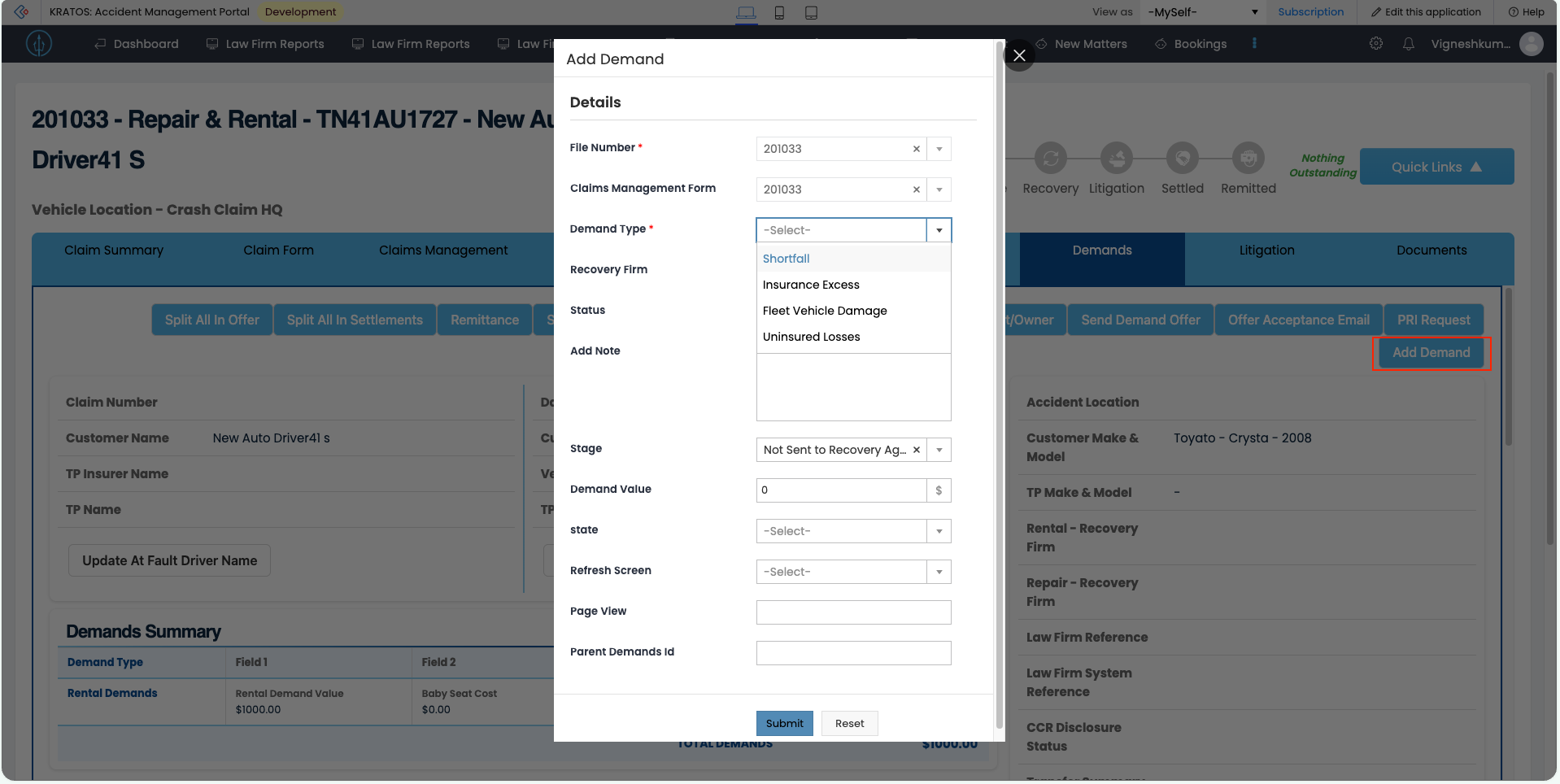
| 1 | Open Demands section | On the claim's Dhtml page, the Demands section shows an Add Demand button. |
| 2 | Add Demand form | Clicking it opens the Add Demand form. |
| 3 | Choose type | User sets Demand_Type (Repair / Rental / Shortfall / Insurance Excess / Towing/Storage / Storage / Fleet Vehicle Damage / Supplementary Repair / Uninsured Losses). |
| 4 | Create | Submitting calls demands.create_demands_with_type, which creates a single Demands record for the chosen type. |
Claim Dhtml → Demands section → [Add Demand]
        │
        ▼
Add Demand form — set Demand_Type
        │
        ▼
Accident App: demands.create_demands_with_type(Demand_Type)
        │
        ▼
New Demands record: Status1 = New File, state = Enable
New Demand Defaults
| Field | Value | Notes |
|---|---|---|
Status1 | New File | Matches the form's documented default; long lifecycle picklist (Negotiate, Settled, etc.) |
state | Enable | Private field, values Enable / Disable — governs whether the demand is active |
Claim Type Change → Demand Disabled
If a claim's Claim_Type1 is changed to drop a cost type, the corresponding demand is no longer needed and is disabled rather than deleted.
Example: claim changes from Towing + Repair + Rental → Repair + Rental. The Towing demand is no longer required, so its state is set to Disable. The Repair and Rental demands are unaffected.
Claim_Type1 changed (cost type removed)
        │
        ▼
Demand(s) for the removed cost type → state = Disable
        │
        ▼
Remaining demands (for cost types still present) → unchanged
Manual Status Updates
Once created, a demand's Status1 can be updated directly from the Status field on the Demands form — moving it through the lifecycle (e.g. New File → Chase for Offer → Negotiate → Settled).
Status1 (lifecycle, default New File) is distinct from Status (recovery-agent pipeline: Not Sent to Recovery Agent / Sent to Recovery Agent / Demands Issued / Demands Settled / Demands Litigated / Demands Remitted / Cancel) — see the note on the Demands field reference.
Flow 4 — Is_All_Demand_Settled Rollup
Whenever a demand's settlement/remittance fields change, every Demands record linked to the claim is checked against a per-demand "settled" condition. If all of them satisfy it, Claim_Form.Is_All_Demand_Settled is set to true; if any one doesn't, it's set to false.
Per-demand "settled" condition:
(Demands.Date_Settled != null && Demands.Status1 == thisapp.demand_status.settled())
        ||
(Demands.Status1 == thisapp.demand_status.remitted()
        && Demands.Settlement_Amount >= 0
        && Demands.Date_Remitted != null
        && Demands.Remittance_Amount >= 0)
A demand counts as settled if either:
Status1= Settled andDate_Settledis recorded, orStatus1= Remitted, with a non-negativeSettlement_Amount, a recordedDate_Remitted, and a non-negativeRemittance_Amount
For each Demands record linked to the claim
        │
        ▼
Does it satisfy the "settled" condition above?
        │
        ├── True for every linked demand → Claim_Form.Is_All_Demand_Settled = true
        └── False for at least one demand → Claim_Form.Is_All_Demand_Settled = false
This is the same flag the Demand Dashboard panels filter on (Is_All_Demand_Settled == false) to surface only claims with outstanding demands.
Related
- Demands — full Demands form field schema
- Claim_Form —
Claim_Type1,Is_All_Demand_Settled, and the per-type demand lookup fields (Repair_Demand,Rental_Demand,Tow_Demands_1/_2, etc.) - Demand Dashboard — panels filtered on
Is_All_Demand_Settled