Demands Status and Stage
Where to Find It
- App: KRATOS: Accident Management Portal
- Page: Claim Dhtml page → Demands section
- Form: Demands (
Demands) →Status(Demand Stage) andStatus1(Demand Status)
Overview
The Demands section on the Claim Dhtml page shows one box per demand on the claim — Rental Demand, Towing/Storage Demand, etc., based on the claim's Claim_Type1 (see Demands Flow for how each demand is created). Each box shows two related but distinct fields for that demand:
- Demand Stage — the
Statusfield, the recovery-agent pipeline (Not Sent to Recovery Agent / Sent to Recovery Agent / Demands Issued / Demands Settled / Demands Litigated / Demands Remitted / Cancel) - Demand Status — the
Status1field, the lifecycle picklist (New File, Settled, Remitted, etc.)
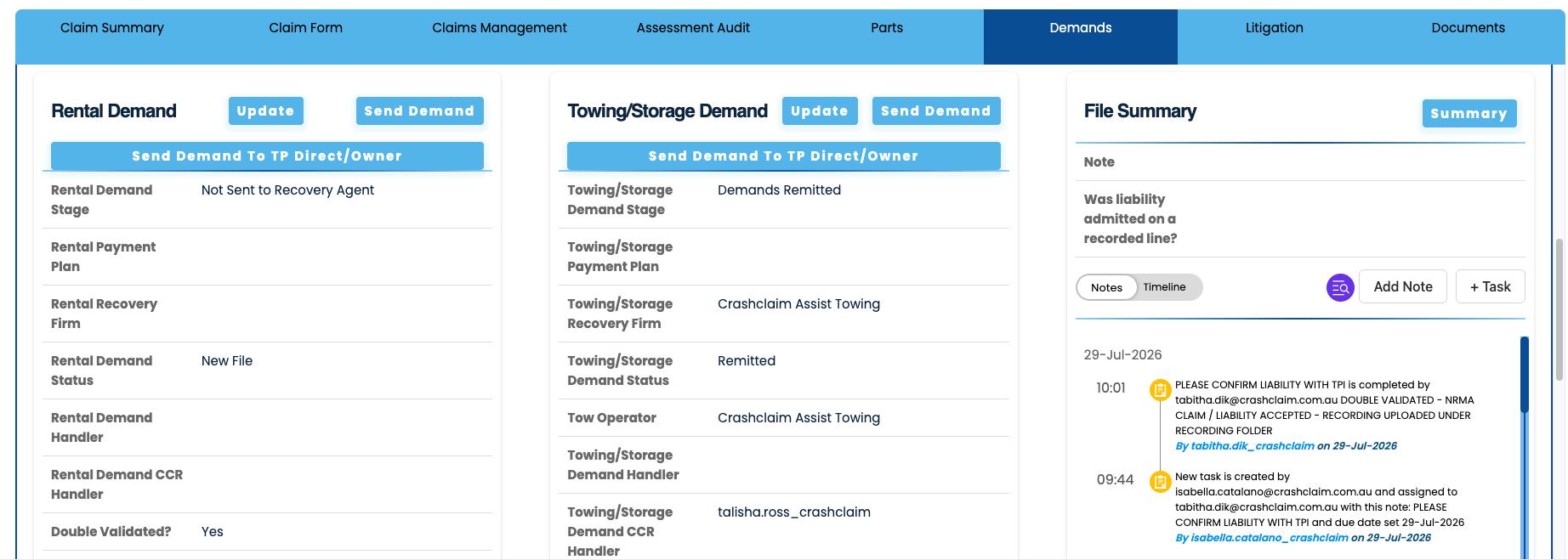
In the screenshot above: the Rental Demand has Demand Status New File and Demand Stage Not Sent to Recovery Agent. The Towing/Storage Demand has Demand Status Remitted and Demand Stage Demands Remitted — the end state of the Remit Flow documented below.
Settle Flow
When, on the Demands form, the Demand Status (Status1) is set to Settled, and both Settlement Amount (Settlement_Amount) and Date Settled (Date_Settled) are filled in, submitting the form updates the Demand Stage:
Demands form
   Status1 (Demand Status) set to "Settled"
   Settlement_Amount filled
   Date_Settled filled
        │
        ▼
   Form submitted
        │
        ▼
Demand Status (Status1) = Settled
Demand Stage (Status)   = Demands Settled
Remit Flow
Continuing from a settled demand, when Date Settled and Settlement Amount are already recorded, and the Demand Status (Status1) is set to Remitted with Remittance Amount (Remittance_Amount) and Date Remitted (Date_Remitted) filled in, submitting the form updates the Demand Stage:
Demands form
   Date_Settled already set
   Settlement_Amount already set
   Status1 (Demand Status) set to "Remitted"
   Remittance_Amount filled
   Date_Remitted filled
        │
        ▼
   Form submitted
        │
        ▼
Demand Status (Status1) = Remitted
Demand Stage (Status)   = Demands Remitted
Fields Involved
| Field | Displayname | Type | Role |
|---|---|---|---|
Status1 | Demand Status | picklist | Lifecycle status set by the user — New File, Settled, Remitted, etc. |
Status | Demand Stage | picklist | Recovery-agent pipeline stage — moves to Demands Settled / Demands Remitted per the flows above |
Date_Settled | Date Settled | date | Required (with Settlement Amount) for the Settle Flow |
Settlement_Amount | Settlement Amount | AUD (currency) | Required (with Date Settled) for the Settle Flow |
Remittance_Amount | Remittance Amount | AUD (currency) | Required (with Date Remitted) for the Remit Flow |
Date_Remitted | Date Remitted | date | Required (with Remittance Amount) for the Remit Flow |
This is the same combination of fields used by the per-demand "settled" condition behind the Is_All_Demand_Settled rollup — see Demands Flow — Flow 4.
Related
- Demands Flow — how demands are created, disabled, and rolled up into
Is_All_Demand_Settled - Demand Dashboard — panels counting open demands by claim type
- Demands — full Demands form field schema