Rental Days and All Rental Only Report
Where to Find It
- App: KRATOS: Accident Management Portal
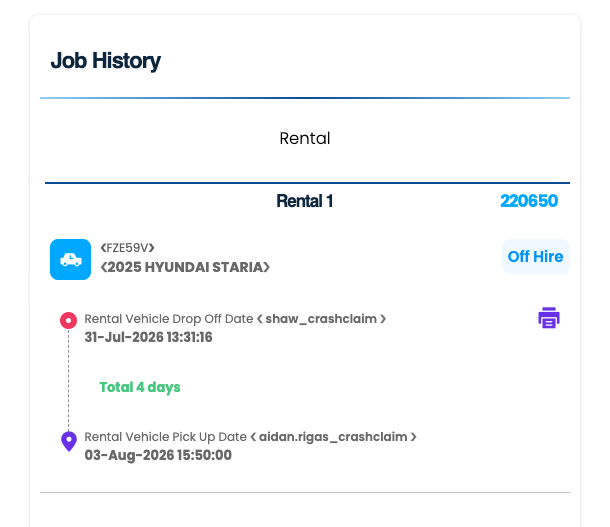
- Page: Claim DHTML page → Job History section → Rental tab
- Form: Claims Management Form (
Claims_Management_Form) → Car Rental Fees →New_Rental_Days - Report: All Rental Only Report
Overview
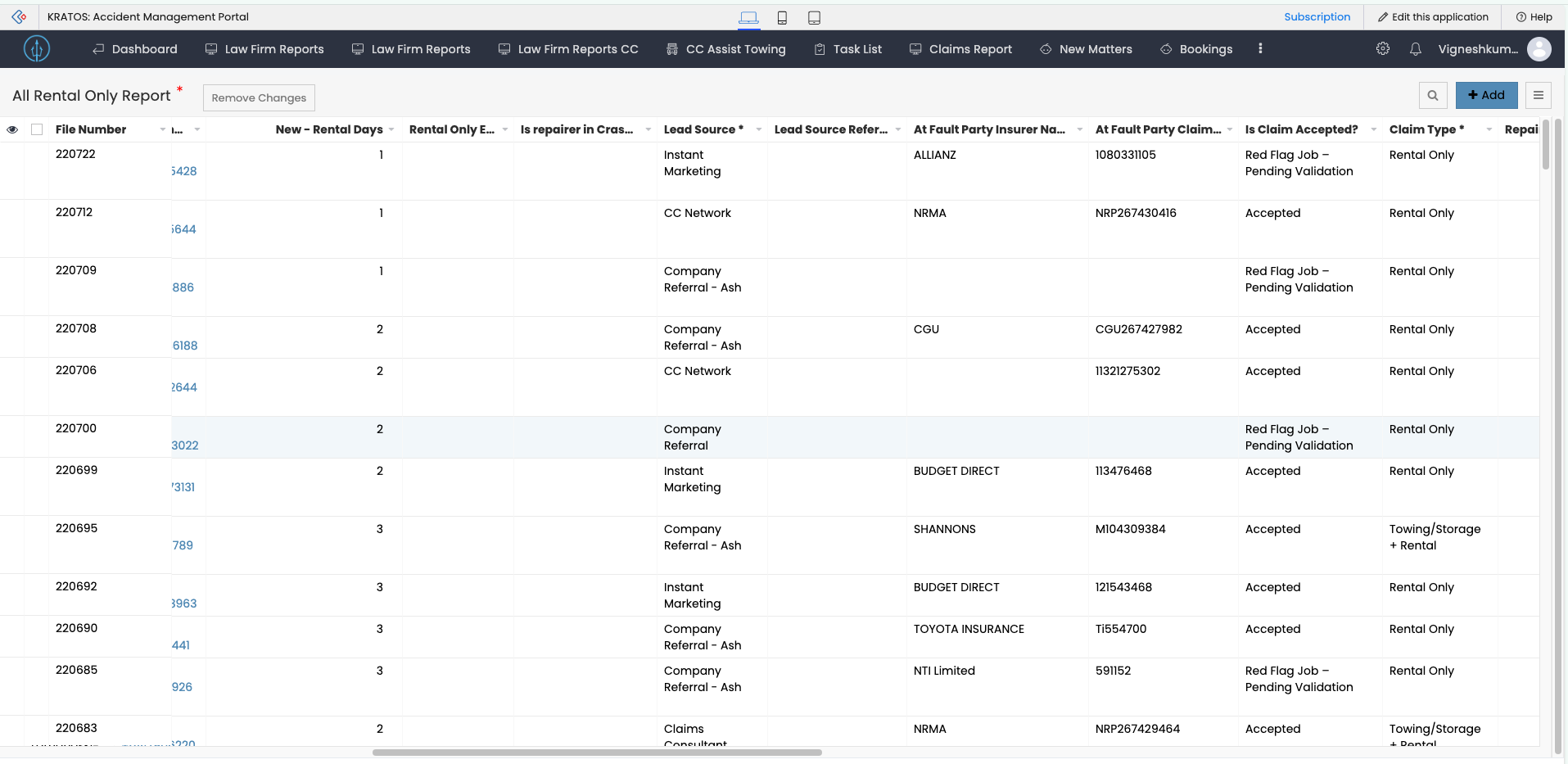
Each job card in the Job History → Rental tab shows a Rental Vehicle Drop Off Date and a Rental Vehicle Pick Up Date. The number of days between these two dates is displayed on the card as Total X days, and is backed by the New_Rental_Days number field on the Claims Management Form (under Car Rental Fees). The same New_Rental_Days value is what the All Rental Only Report lists per file, under its New - Rental Days column.
Fields Involved
| # | Field | Type | Linked Form | Role |
|---|---|---|---|---|
| 1 | Rental Vehicle Drop Off Date | date-time | Vehicle_Movement | Start of the rental period, shown on the job card |
| 2 | Rental Vehicle Pick Up Date | date-time | Vehicle_Movement | End of the rental period, shown on the job card |
| 3 | New_Rental_Days | number | Claims_Management_Form (Car Rental Fees) | Calculated rental day count, shown as "Total X days" on the job card and as the "New - Rental Days" column on the All Rental Only Report |
Calculation Logic
New_Rental_Days is calculated by an Accident App function:
accident_app.functions.claims_management_form.rental_duration_calculation
This function computes the number of days between the Rental Vehicle Drop Off Date and Rental Vehicle Pick Up Date and writes the result into New_Rental_Days on the Claims Management Form.
Rental Vehicle Drop Off Date + Rental Vehicle Pick Up Date
        │
        ▼
claims_management_form.rental_duration_calculation()
        │
        ▼
New_Rental_Days updated on Claims Management Form
        │
        ▼
Displayed as "Total X days" on the Job History → Rental job card
   and as "New - Rental Days" on the All Rental Only Report
When It Recalculates
| Trigger | Behaviour |
|---|---|
| Claims Management Form opened or edited | rental_duration_calculation re-runs and updates New_Rental_Days immediately |
| Daily scheduler | schedule.update_new_rental_days_field() runs once a day and refreshes New_Rental_Days for jobs that weren't opened/edited that day |
The daily scheduler exists so that New_Rental_Days (and the "Total X days" / "New - Rental Days" figure) stays current even for rentals nobody has opened the claim for recently — the day count would otherwise go stale until someone next touches the form.
All Rental Only Report
Lists every Rental Only (and towing/storage + rental) file with its computed New_Rental_Days, alongside Lead Source, At Fault Party Insurer, Claim Acceptance status, and Claim Type — one row per file, sorted by File Number.
Related
- Claims Management Form — full field schema, including Car Rental Fees
- Vehicle_Movement — Rental Vehicle Drop Off Date / Pick Up Date field schema
- Movement Action — the general CC / Loan Car Swap / Delivery / PRI-Recto flow reference