Activity Dashboard — Member Productivity Tracker
1. Overview
The Activity Dashboard is a Zoho Creator application that tracks user activity and reports member productivity.
Every user action inside the app (open file, add note, add demand, add task, etc.) is recorded in the Activity_Log form with a timestamp. A background scheduler runs at the end of each day, calculates productive/break/idle minutes per user, and saves the result to Daily_Activity_Summary. The dashboard page reads from Daily_Activity_Summary and displays member productivity filtered by team and date range.
2. How It Works
Key forms:
| Form | Purpose |
|---|---|
Activity_Log | Stores every user action with action type and timestamp |
Daily_Activity_Summary | Stores the daily calculated summary per user |
Team | Stores team members and leaders |
Data flow:
- A user performs an action (opens a file, adds a note, submits a form, etc.) → an entry is written to
Activity_Log. - At the end of the day, the Daily User Activity Monitoring scheduler batches unprocessed
Activity_Logrecords and triggers the Migrate Daily Activity Summary scheduler. - That scheduler calculates productive/break/idle minutes and per-action-type counts, and writes/replaces a
Daily_Activity_Summaryrecord for each user for that day, then marks the source logs asMigration = true. - The dashboard page calls
get_dashboard_html_data(), which aggregatesDaily_Activity_Summaryrecords for the selected team and date range and renders the HTML.
Action types tracked (recorded via action_type on Activity_Log, counted per day on Daily_Activity_Summary):
| Action Type | Logged When |
|---|---|
open_file | User visits the claim detail page, on web (Claim_dhtml) or mobile (Claim_mhtml) |
update_claim | User updates the Claim form |
update_cc_assist | User updates the Update Fields CC Assist form |
add_note | User adds a note via the Add Note form |
add_file_summary | User creates a File Summary |
update_file_summary | User updates an existing File Summary |
update_claims_mgmt | User updates the Claims Management form |
add_parts_order | User creates a new Parts Order |
update_parts_order | User updates an existing Parts Order |
update_audit | User updates the Assessment Audit form |
add_demand | User creates a new Demand via the Add Demand form |
update_demand | User updates an existing Demand |
add_task | User creates a new Task |
update_law_firm | User updates the Law Firm form |
total_events | Aggregate of all action types combined |
3. Time Classification
Activity time per user is bucketed into three states, all stored in minutes and displayed in Xh Ym format. These are calculated per day by fn_calc_productive_hours from the raw Activity_Log timestamps for that user/day:
| State | Definition |
|---|---|
| Productive | Sum of the gaps between consecutive Activity_Log events on that day, counted only where the gap is ≤ IDLE_THRESHOLD (30 minutes) |
| Break | Currently a fixed 30 minutes/day placeholder — a real calculation against a Break_Log form exists in the code but is commented out pending that form being finished |
| Idle | The window from the day's first event to its last event, minus productive and break minutes, floored at 0 |
Note: a gap between events that is longer than 30 minutes is not added to productive time, but it also isn't separately bucketed — it simply falls out of the productive sum and is absorbed into the idle calculation below.
Productive hour vs. non-productive hour:
- Productive hour — time where the user's next
Activity_Logevent follows within 30 minutes of the previous one. The system treats a fast follow-up action as evidence the user was continuously working during that gap, so the whole gap (not just the endpoints) is counted as productive. - Non-productive hour — everything else in the user's tracked day:
break(the fixed 30-min/day placeholder) +idle(any gap longer than 30 minutes between actions, i.e. the user stepped away or stopped working). On the dashboard's time bar, the yellow (break) and grey (idle) segments together represent non-productive time, versus the green (productive) segment. - A user with very few
Activity_Logevents in a day — even if spread evenly — will show mostly idle/non-productive time, because idle is derived from the whole first-to-last-event window, not just the gaps between logged actions.
4. Daily Summary Calculation
Handled by two schedulers defined in user-activity-dashboard.deluge:
Daily User Activity Monitoring (runs once per day)
- Reads unprocessed logs:
Activity_Log[Migration == false]. - If there are fewer than 200 unprocessed logs, schedules a single
Migrate_Daily_Activity_Summaryrun 15 minutes later. - If there are 200+ logs, splits the backlog into batches of 200 and schedules up to 30 staggered
Migrate_Daily_Activity_Summaryruns (one per batch, a few minutes apart). - Re-schedules itself to run again
+1 day.
Migrate Daily Activity Summary (per batch)
- Pulls up to 200 unmigrated logs:
Activity_Log[Migration == false] range from 0 to 200. - For each distinct user/day combination:
- Deletes any existing
Daily_Activity_Summaryrecord for that user/day (to avoid duplicates on re-run). - Calls
fn_calc_productive_hours(user, date)andfn_count_events(user, date). - Inserts a new
Daily_Activity_Summaryrecord and populates it with the returned productive/break/idle minutes and per-action-type counts. - Marks each processed
Activity_Logrecord asMigration = true.
- Deletes any existing
stats = thisapp.activity_log.fn_calc_productive_hours(log.User,log_date.toDate());
counts = thisapp.activity_log.fn_count_events(log.User,log_date.toDate());
fn_calc_productive_hours(user_id, day_date)
- Pulls that user's
Activity_Logrows for the day, sorted bylogged_atascending. - Walks consecutive pairs of events: if the gap between them is ≤
IDLE_THRESHOLD(30 min), the gap is added toproductive_mins. break_minsis hardcoded to30(aBreak_Log-based calculation is written but commented out until that form is ready).idle_mins= (time from first event to last event) −productive_mins−break_mins, clamped to a minimum of 0.- Returns a map:
productive_mins/productive_hours,break_mins/break_hours,idle_mins/idle_hours(hours are minutes ÷ 60, rounded to 1 decimal).
{"productive_mins":152,"productive_hours":2.5,"break_mins":30,"break_hours":0.5,"idle_mins":88,"idle_hours":1.5}
fn_count_events(user_id, day_date)
- Pulls that user's
Activity_Logrows for the day (no sorting needed). - Tallies occurrences per
Action_Typeinto a map (e.g.open_file,add_note,update_demand, …). - Adds a
total_eventskey holding the sum of all per-action-type counts. - Returns the counts map directly — this is what
Migrate Daily Activity Summaryreads viacounts.containKey(...)/counts.get(...)to populate eachDaily_Activity_Summaryfield.
5. Dashboard Features
-
Team and date range filter — selects the team (
input.team_id) and date window (input.from_date/input.to_date); defaults to the first team alphabetically if none is selected. -
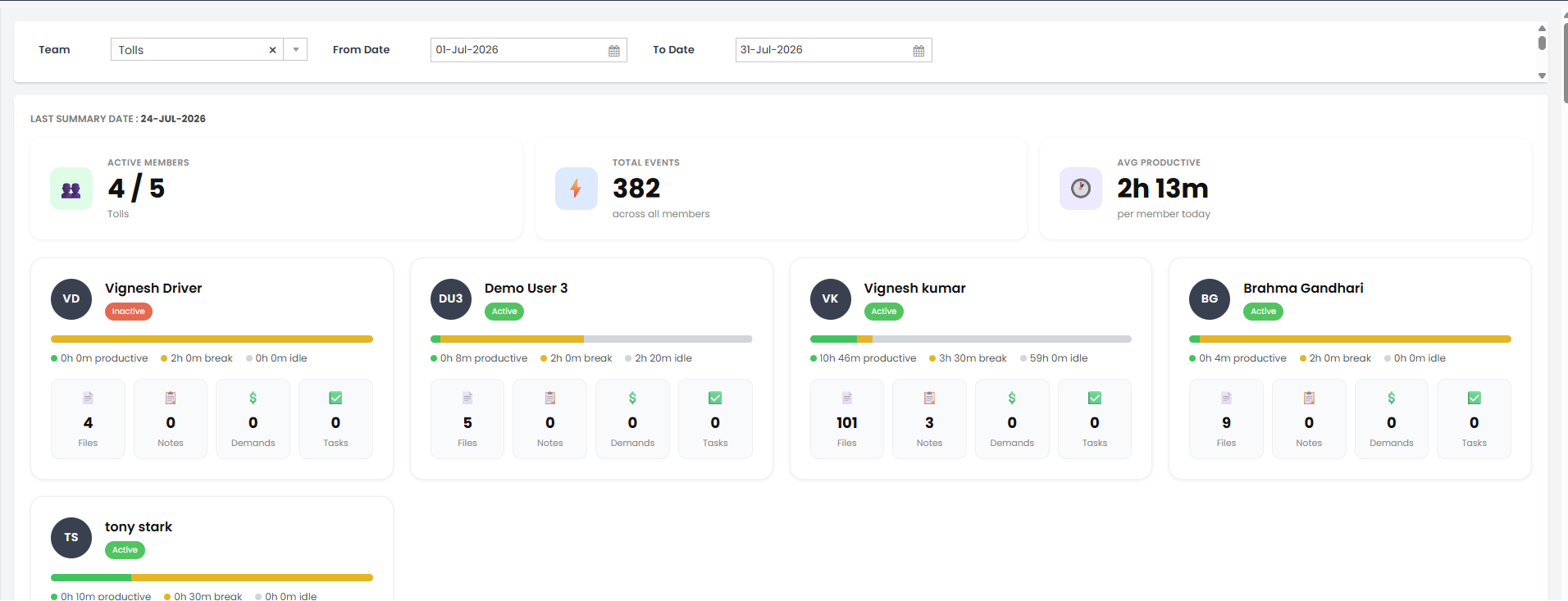
Summary cards — Active Members (active/total), Total Events (across all members), Avg Productive time (per member).
-
Member cards — one card per team member/leader:
- Avatar showing initials, member name, and (for team leaders) a Leader badge.
- Active (green) / Inactive (red) status badge, driven by the linked
User.Statusfield. - A productive/break/idle time bar with a dot-legend underneath (
● productive,● break,● idle), each labelled inXh Ymformat — e.g.10h 46m productive,3h 30m break,59h 0m idle. - Four action-count tiles: Files, Notes, Demands, Tasks.
-
Last Summary Date — shown at the top of the dashboard via
get_last_summary_date(), indicating data freshness (e.g.LAST SUMMARY DATE: 24-JUL-2026). -
Multi-day range support — when a date range spans multiple days,
build_member_data()sums all matchingDaily_Activity_Summaryrows per user across the range rather than showing a single day. -
All Activities Graph — a separate report widget (not part of the HTML snippet above) showing a stacked bar chart of every action-type total per user, filterable by User and Summary Date, with a toggleable legend covering all tracked action types (
all_action_flows,update_cc_assist,update_claim,update_audit,add_note,update_parts_order,update_demand,add_file_summary,update_claims_mgmt,update_file_summary,update_law_firm,add_demand,add_task):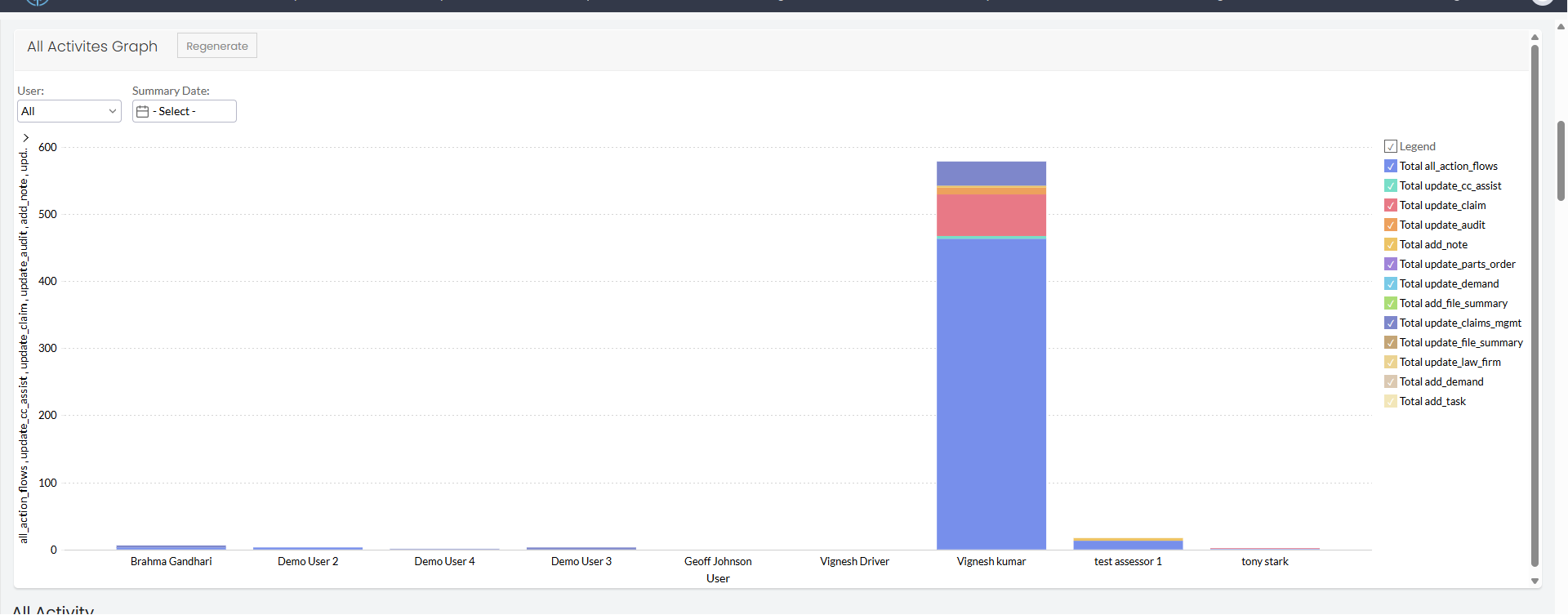
-
Tab/table view of raw activity logs — referenced in the HTML (tab bar, per-tab table,
get_tab_activity_logs()) but currently commented out / disabled in the shipped markup.
6. Deluge Functions
| Function | Signature | Purpose |
|---|---|---|
get_dashboard_html_data | (team_id, from_date, to_date) | Builds the full dashboard payload for a team: team name, member list, totals, and average productive time |
build_member_data | (user_id, is_leader, from_date, to_date) | Aggregates one user's Daily_Activity_Summary rows across the date range into a single display-ready map |
get_last_summary_date | () | Returns the most recent date a daily summary was calculated, for the freshness indicator |
get_tab_activity_logs | (team_id, action_type, from_date, to_date) | Returns raw activity log rows for a given action type tab (currently unused — tabs are disabled) |
fn_calc_productive_hours | (user_id, date) | Calculates productive minutes from consecutive Activity_Log gaps (≤30 min), a fixed 30-min break placeholder, and idle as the remainder — see Time Classification |
fn_count_events | (user_id, date) | Counts occurrences of each Action_Type for a user on a given day, plus a total_events sum |
7. Key Logic
Team aggregation (get_dashboard_html_data):
- Iterates
Team.Team_LeadersandTeam.Team_Membersseparately, callingbuild_member_data()for each and tagging leaders withis_leader = true. - Skips any member with no
Daily_Activity_Summaryrecords in range (build_member_datareturns an empty map, which is not added to the list). - Computes
avg_productiveas total productive minutes across all included members divided by member count, rounded to 1 decimal.
Per-member aggregation (build_member_data):
- Sums
productive_mins,break_mins,idle_mins, and all per-action-type counters across everyDaily_Activity_Summaryrow in the date range for that user. - Derives initials from the user's name by taking the first letter of each space-separated part (e.g. "Vignesh Driver" →
VD, "Demo User 3" →DU3). - Formats minutes into
Xh Ymstrings for productive/break/idle time. - Flags
is_activebased on the linkedUser.Statusfield — drives the green Active / red Inactive badge on the member card. - Only
open_file,add_note,update_demand, andadd_taskcounts surface on the member card tiles (Files / Notes / Demands / Tasks); the remaining action-type counters (update_claim,update_cc_assist,add_file_summary,update_file_summary,update_claims_mgmt,add_parts_order,update_parts_order,update_audit,update_law_firm) are aggregated but only exposed via the All Activities Graph, not the member card.
Time bar rendering (dashboard HTML):
- Converts each member's productive/break/idle minutes into percentages of their total tracked time (guarding against a zero-minute total by treating it as 1) to size the three segments of the time bar.
total_mins = prod_mins + brk_mins + idle_mins;
if(total_mins <= 0)
{
    total_mins = 1;
}
p_pct = ((prod_mins * 100.0) / total_mins).round(1);